
This came across my desk today. Sometimes you may need to set up a linear buckling solution that accounts for effects of preload. The simplest example is the crushing of a pressurized soda can. The pressure is constant, but the external load compressing the can may vary, and perhaps you want to know that critical external force. Now replace the soda can with a rocket fuel tank. Same principle. Yet another example is buckling of the bicycle wheel spokes in the third tutorial in Learning Femap, where the spokes are pretensioned and the analyst may want to know what external load (of a riders weight, for example) will prompt spoke buckling.
Whatever you’re simulating, when setting up a buckling with preload run, here’s what you ultimately want in your Nastran input file case control:
INIT MASTER(S)
NASTRAN SYSTEM(319)=1
ID buckling,Femap
SOL SEBUCKL
TIME 10000
CEND
  TITLE = Buckling Analysis
  ECHO = NONE
  DISPLACEMENT(PLOT) = ALL
  SPC = 1
SUBCASE 1
  LABEL = EXTERNAL LOADING
  LOAD	= 1
SUBCASE 2
  LABEL = PRELOAD
  LOAD = 2
SUBCASE 3
  LABEL = BUCKLING W PRELOAD
  STATSUB(BUCKLING) = 1
  STATSUB(PRELOAD) = 2
  METHOD = 1
BEGIN BULK
Here, “EXTERNAL LOADING” is the loading that will prompt the buckling. Said in another way, it’s the important non-constant load of interest. The “PRELOAD” subcase can be pressure, or some constant/ pre-existing loading on the structure (make sure your preload alone doesn’t induce buckling!). The critical Nastran command here is STATSUB. STATSUB selects the static solution to use in forming the differential stiffness for buckling analysis, normal modes, complex eigenvalue, frequency response and transient response analysis. The equation Nastran solves is this:
(K + Kpreload + λ*Kbuckling) * φ = 0
Getting Femap to write out the case control in this way is not direct. You’ll need to manually edit the input file. But on the plus side, it is a relatively simple modification of the case control. For further reading, check out the following references:
- NX Nastran Quick Reference Guide – Entry for STATSUB case control command
- NX Nastran User Manual – Chapter 22 Linear Buckling
- Essential Considerations for Buckling Analysis. Sang Lee, MSC Software. Worldwide Aerospace Conference and Technology Showcase, Toulouse, France, Sept. 24-26, 2001
I made a quick FEM of the Red Bull can, and ran it with and without pressurization preload. Here are the results:
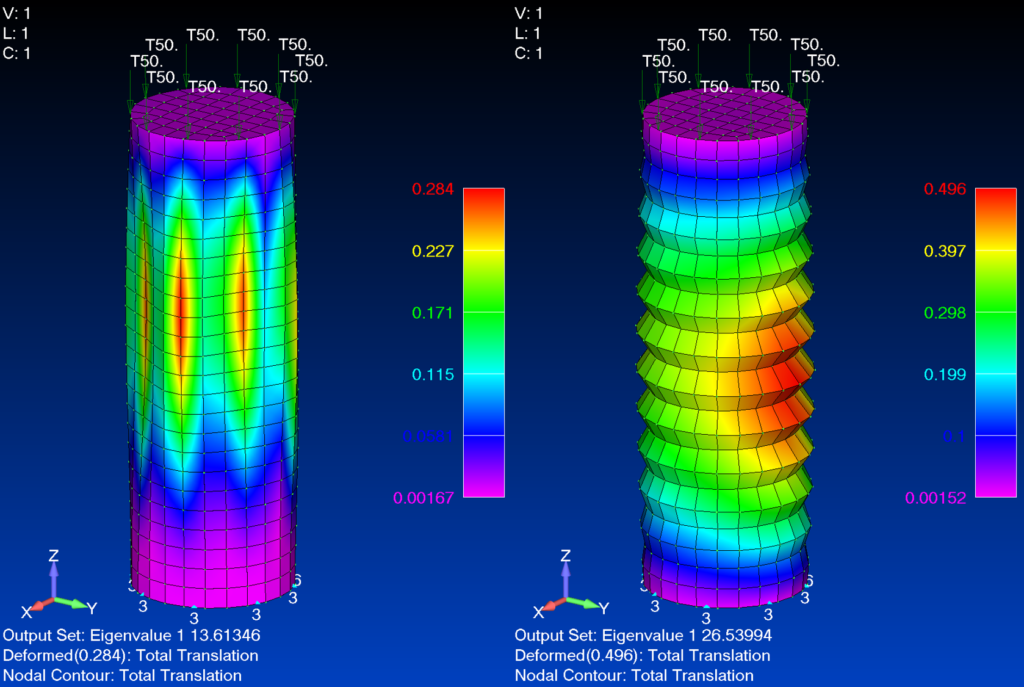
You can clearly see the difference in buckling behavior with the pressure added in. The added pressure stiffening increases the critical buckling Eigenvalue by DOUBLE! This is why large and small structures take advantage of pressurization!
Additional tip for running linear buckling with SOL105 when inertia relief is specified, as far as the author’s experience goes. The Nastran user’s manual has the rules but the idea here is that a fictitious SUPORT1 constraint needs to be supplied to provide some reference for the buckling solution. The organization of the input file needs to look like this:
INIT MASTER(S)
NASTRAN SYSTEM(319)=1
ID buckling,Femap
SOL SEBUCKL
TIME 10000
CEND
  TITLE = Buckling Analysis
  ECHO = NONE
  DISPLACEMENT(PLOT) = ALL
SUBCASE 1
  LABEL = LOAD
  SUPORT1 = 1              $ Provide the suport1 entry
  LOAD	= 10               $ Provide the load case set ID in the bulk data section
SUBCASE 2
  LABEL = BUCKLING
  STATSUB(BUCKLING) = 1    $ Reference the load subcase
  METHOD = 1               $ EIGRL card in bulk data section
  SUPORT1 = 1              $ Provide the suport1 entry in the bulk data section
BEGIN BULK
PARAM,INREL,-1
SUPORT1,1,GRID1,3
SUPORT1,1,GRID2,123
SUPORT1,1,GRID3,13
Thanks for reading! Let me know if you have any comments or questions….